Tuesday, March 31, 2009

NES emulator gets accelerometer controls


Remember that NES emulator for the iPhone that came out a while back? I personally haven't installed it on my phone (I'm still sorting through all of the free games on the App Store), but I do admit that the thought of playing old-school games on my iPhone would be a ton of fun. Now the team that originally brought us the emulator have taken it one step further. Now you can control Mario with your iPhone's accelerometer.

Sure, most NES games are going to require more precise controls than your accelerometer will allow you, however, it's cool that we have the option now. My only question is when Nintendo is going to realize just how much money they could make by bringing these games to the iPhone (legally). Of course with the DS out there, they could probably care less about the iPhone.

[via UberGizmo]


Monday, March 30, 2009

John Carmack talks about bringing a “graphical tour de force” to the iPhone


We've known for a little while that id Software has made it well known that they are developing for the iPhone. Unfortunately we haven't really heard anything from them since sometime around March. John Carmack (co-founder of id) admits that he's kicking himself for not having anything ready at launch. But don't worry, he's planning on bringing one of id's existing franchises to the platform in what he calls a “graphical tour de force.”

Sure, he's keeping quiet on just which franchise they're working on, but I think we all know it's going to be Doom. Somewhere in the future he also says we can expect some sort of MMO from the company, again on the iPhone. I'm not really sure what I think about playing an MMO on my iPhone, but I'll keep an open mind. I'm just glad to hear that id is really taking the gaming potential of the iPhone seriously.

[via Joystiq]


Saturday, March 28, 2009

iSkin updates their revo line of iPhone cases


Remember that cool revo case from iSkin that came out last year? Since it was for the original iPhone, you won't have any luck getting it to fit your new iPhone 3G. Thankfully, iSkin has introduced the revo2.

The revo2 is little more than an update to the original. The look has changed a little, but the overall feel is still the same. You get a nice Microban antimicrobial case with an detachable ViSOR face shield to keep your screen from getting all scratched up.

You can chose from three color schemes: Onyx (Black/Black), Diablo (Red/Black) or Sonic (Blue/Black). The price hasn't been updated, as it will set you back just as much as its predecessor, which was $39.

[via CoolestGadgets]


Thursday, March 26, 2009

Quickie Review: Recorder


Have you been looking for a simple, easy-to-use voice recorder on the iPhone. Well, $0.99 can get you Recorder by Retronyms and it's truly just a recorder, and that's what I like about it.

While I love add-on features and extras, sometimes all you want and need is a big red record button and that's precisely what Recorder gives you. Of course, you can also organize your recorded memos, rename them from the standard "Memo" and even e-mail them to yourself. These last two features were included in the application's recent update, which were completely needed, if you ask me. The program's not perfect, but if all you need is a quick way to take verbal notes, it's foolproof. 

Supposedly, you can record hours of notes and though I haven't tried that, it did go past the limited memo length of 15 seconds that the similar app, Jott offers. 

Okay, verdict time. Is it worth the 99 cents? If you need a voice recorder, then yes. I mean, who hasn't forgotten something while out and about because you swore you'd "write it down" when you got a chance? I'd shell out the almost dollar and buy it.


Wednesday, March 25, 2009

Quickie Review: Pandora


I had big plans today. I was going to give a glowing review to Pandora, an Internet radio application for the iPhone that surpasses just about anything else like it. But this morning when I attempted to open the app, all I got was a dialog popping up that said, "Pandora cannot be opened." It looks like after a weekend of tinkering with it, I broke it. Yup, I broke Pandora. 

I've heard of other people having this issue with their apps, as well. Seems like I just need to re-download it. But I digress. I will pretend this inconvenience did not occur and proceed with my review. 

Pandora is not new. It's been online for quite sometime, but now on the iPhone it makes traveling with music--any music you want--much easier. Plus, it's free. It works like this: 

  • Open Pandora
  • Click the + sign and type in the name of an artist or song title
  • Let Pandora work its magic

Now, sometimes the song you want to listen to will play right away, or you'll get something the Music Genome Project thinks you will like. This is a very intelligent program because while it may not always play the specific artist you requested, it will play you songs that are very similar--and will give you the reasons why it's similar. And if it plays a song you dislike or feels is not related to your initial query, vote it a thumbs down. And be sure to give songs you like a thumbs up.

I spent hours playing with this app over the weekend and it's fantastic. However, there were a few times when it got off on a musical tangent, though that was probably my fault for not voting each and every song. 

The only real drawback is you can only skip songs six times within an hour due to their music licenses. That's a bummer, especially when it goes off on a Steely Dan tangent. Hey, no offense to Steely Dan, but that's just not what I wanted to listen to when I typed in "The Eagles." 

Oh well. Good app, nonetheless. Now, if I could only get mine to work again!

Update: Just reinstalled Pandora and we're back in business!


Tuesday, March 24, 2009

Sharing Apps: Easier Than You Think


When it comes to enabling the iPhone to do more than it was intended to do, people typically incorporate hacks or special software to incorporate a new function. So won't it be refreshing today to discover that you can share apps between iPhones without hacks or trickery?

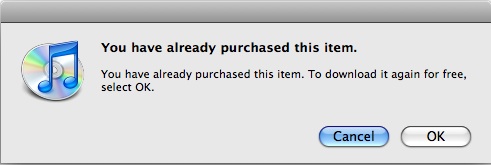
It's simple. Just log into the iTunes library where you want to share the app with your AppleID that you used to buy the app the first time. Go to the AppStore and buy the app again. However, instead of having to pay, you will be prompted with a dialog that says, "You have already purchased this item," and you'll be able to download it again for free. Pretty cool, huh?

Then, just log out of your account on this second computer and the app should sync right up with the iPhone connected to that library. This is great if you and your spouse both have iPhones but don't want to have to buy duplicate apps.  

[via MacRumors]


Monday, March 23, 2009

AdMob Loads Up iPhone 3G With Ads


AdMob announced last Thursday the launch of its iPhone 3G ad marketplace in which ads specifically tailored to the iPhone's unique format can be bought.

These new ads are not just browser-based, however, and will also be functional in native iPhone applications and with one click, you will be taken to the AppStore, iTunes or some other specified location. Both Brand and Performance formats will be available. 

Major launch partners include: 

  • Jaguar
  • Ford
  • Electronic Arts
  • Universal Pictures
  • Land Rover

It will be interesting to see how intrusive these ads are or if they are pretty seamless. But if you ask me, don't we get enough advertising in our lives as it is? Might this be going a bit overboard? 

[via FierceMobileContent]


Sunday, March 22, 2009

First Generation iPhone Gets Glitzy


So, if you were going to encrust an iPhone with 1,179 diamonds, wouldn't you make sure it was the newest iPhone, first? You know, that would be on my priority list.

But apparently those at Amosu didn't think much of it when they loaded up their Amosu Ultimo Diamond iPhone (not 3G) with the mother-load of sparklies.  This thing is 16.18 karats and costs $177,300. You know, you could buy a house for that in the midwest! Oh, but you also get a year's worth of VIP International Concierge Service to go along with the shiny monstrosity. That totally justifies it.

It makes you wonder if the makers of such useless things as this ever sit back and think, "Hey, you know this is really wasteful and not a good idea." Eh, I didn't think so, either.

[via IntoMobile]


Friday, March 20, 2009

iPhone 3G Firmware Hits Developers


There's a big difference between the first gen iPhone and the iPhone 3G. Apple is moving forward with firmware updates much quicker this time around. In fact, the 3G 2.1 firmware is already being offered to developers for beta testing.

Initial talk is showing that the main focus of the updates will revolve around the GPS. Specifically, Core Location features are being added that track your direction of movement and rate of speed. It's not turn-by-turn yet, but it looks to be well on its way. 

No word yet on whether or not 2.1 will address the accelerometer issues, app crashes or random reboots, but it definitely seems like Apple is focused on expanding what's currently inside the iPhone 3G to its fullest capacity. 

[via The Boy Genius Report]


Wednesday, March 18, 2009

Dexter Game coming exclusively to the iPhone


I'll be honest, I don't watch a ton of TV these days. I've heard bits about a show called Dexter that my friends seem to like (for a minute I thought they were suddenly excited about Dexter's Lab again). Well, it's a show about a serial killer, which seems like it could be interesting. Well there has been talk of a game based on the show, and it was recently revealed at Comic-Con that it would be coming exclusively to the iPhone (and iPod Touch).

Little is known about the game, though we do know that it will feature episodic content (which seems to be the flavor of the week in the gaming industry) with gameplay featuring touch screen gesture controls. They will be throwing in text messages and phone calls to add to the realism of the game. I'm not really sure what I think about that last part, but I know that I really don't feel like paying for texts and minutes just to play a game.

[via Kotaku]


Tuesday, March 17, 2009

Quickie Review: Korebasi Lite


In my continuing quest for awesome iPhone games, I came across Korebasi Lite. This is another maze-like game where you use the accelerometer to navigate. You need to move your ball to the crystal while rolling over bonus items like bananas, cherries, clocks and more. You'll also encounter puzzles and enemy balls which will hinder your progress.

I have to say that this is the first accelerometer-based game that I've enjoyed more when turning that particular feature off. Trying to get your ball to change directions can be quite a pain sometimes, and eventually became enough of an annoyance that I turned it off. The alternative method is to simply place your finger where you would like the ball to go.

The free version of the game takes up 3.2MB of space and features 10 levels. You can purchase the full version which has 60 levels and needs 8.9MB. I'm pretty much on the fence about this game, it just seems a little boring after a while. I'd suggest checking out the Lite version to see what you think before paying $1.99 for the full game.


Friday, March 13, 2009

Pandora App Updated with Stereo WiFi and More


The Pandora app for the iPhone has just been updated to version 1.1 and it brings with it several impressive changes. Most impressive is the inclusion of stereo streaming over WiFi.

Updates and new features or Pandora for iPhone 1.1 include:

+ Stereo over WiFi - Pandora stations now play in high bitrate stereo when using Pandora over WiFi. This makes an iPod touch the perfect companion to your living room stereo. Just dock and play.

+ Station Resume - when you're using Pandora and switch to another application, or take an incoming phone call, the music will resume right where you left off when you start Pandora back up. It's not as good as background listening (which isn't currently possible on the iPhone) but at least you won't miss anything if you need to hop out to another app for a minute.

+ Search Auto-Complete - as you type an artist, song or composer in the station creation screen we will offer suggestions in real time as you go.

+ Station Sorting - view your stations either by the creation date or alphabetically.

+ On Phone Registration - users that are new to Pandora can now complete account registrations on the iPhone and iPod touch.

+ Settings Panel - swap your Pandora login without reinstalling the app.

I'm currently testing out this app--and it looks promising, folks--and will have a full review of it on Monday.

[via Pandora Radio Blog]


Thursday, March 12, 2009

Aurora Feint is Back (That Was Fast)


Remember how I said yesterday that my favorite iPhone game, Aurora Feint had been removed from the iTunes App Store over security concerns? Well, it's back folks! I downloaded the update and all security bugs are fixed. And though the installation took longer this time (and rearranged the layout of my apps, grr!) it seems to be running better.

Plus, a brand new intro video gives players better insight into the RPG element of this game. The creators are sure to note that they do not take information off of your phone without your permission. This is done during the community "opt-in" form, but you can always opt-out of this as well. More puzzles have been added and many bugs fixed. 

Sounds to me like the developers took this set back and made the best of it and then some. 

[via Aurora Feint forum]


Wednesday, March 11, 2009

Quickie Review: AOL Radio


With all of these new apps, I can definitely see how it would be a possibly to eventually max out your iPhone's space, especially if you're using the first-gen iPhone. But luckily there is AOL Radio, which pretty much makes it so you can listen to any radio station across the US, plus a great grouping of online stations. 

I'm telling you, people, I am seriously considering removing most of my iTunes library from the phone and just using these radio stations. Well, maybe not quite. But they are that good quality. It works like this: open AOL Radio--it's free, by the way--and you'll be asked if the app can use your current location. Select "Allow." Then, a list of all the radio stations in your area will appear. You can select one and it will start playing live for you. You can also check in on what stations are playing all the way across the country. 

There are online radio stations to select from as well, so you can really key in on the genre you want to hear at the moment. Plus, there's a list of your recent stations and stations you've favorited. 

My only complaint is that you can't do anything else on your iPhone while listening. All in all, great app to have!