Friday, July 31, 2009

Slasher App Booted from App Store


Looks like yet another app has been kicked off the App Store with no explanation. This time, it was an app called Slasher. It was simple enough. It just featured the image of a knife and when you made a stabbing motion with your iPhone, it made a horror sound. 

For the moment, the only reason that's being tossed around for this app's removal is it may have violated an application regulation that prohibits apps that contain "objectionable" material. 

Sure, the Slasher app may have been silly and pointless, but what was so wrong about it? I'd be interesting in hearing the official reason, if there ever is one.

[via MacWorld]


Thursday, July 30, 2009

Netshare Probably Won’t Come Back to App Store


Nullriver's Netshare app that allowed you to share your iPhone's internet connection with your laptop or desktop computer, was pulled from the App Store, as you know. And while early reports indicated the app would be coming back, it's not looking too good for NetShare now. 

While Apple was working with Netshare, it seems tethering is against AT&T's terms of service. So, this is bad news for U.S. customers, but international customers may gain access to the app again. We'll have to wait and see. 

If you previously purchased and downloaded Netshare, however, it should still work on your iPhone.

[via MacRumors]


Wednesday, July 29, 2009

PwnageTool 2.0.2 Screen Captures


In case you're not familiar with the PwnageTool or you want to get an idea of what it looks like before you start installing it, these images should give you a good idea. You can get a look at the Installer 4 beta here, too.

The iPhone DevTeam have done it again, folks! There are a few extra mirrors posted up on their site so downloading should be a bit easier now.

[via blog.iphone-dev.org]


Monday, July 27, 2009

‘I Am Rich’ App Had 8 Takers


That iPhone app "I Am Rich," which has been removed from the App Store, actually sold a few copies. I'm not just talking about one or two gullible people. Eight different people downloaded the app. What did they do? See the $999 price tag and think "Hmm, I wonder what happens when I press 'Buy'?" 

Okay, maybe I'm being too harsh. Some that have bought the app are demanding that they get their money back. Apparently, it was thought to be a joke. I'm sorry, but I highly doubt Apple would post a "joke" app on the App Store that doesn't actually deduct money from your account when you press "Buy!" 

And sure, the app was asinine, but at least the developer was honest about the app's function. I mean, he straight up said it did nothing at all! But I digress. 

[via The iPhone Blog]


Sunday, July 26, 2009

iPhone 2.1 Beta 3 Released to Developers


It looks like Apple is moving right along with updates, as the iPhone 2.1 beta 3 firmware has just been seeded to developers. 

The beta is meant for developers to test, only. However, phones that have been updated to this new version cannot be used to develop apps for the App Store. Likewise, once you update, your phone cannot be reverted back to the old version, so update with caution, developers. 

Word has it that the update contains numerous bug fixes and beginning support for background notifications

[via TUAW]


Friday, July 24, 2009

PwnageTool 2.0.2 Is Up!


Yesterday, the DevTeam reported that there was a slight hold up with PwnageTool 2.0.2 and that we wouldn't see its release until sometime later today. But they've stayed up late, fixed the bug and you can download the tool right this second!

They recommend that you update your current version by using Sparkle, the tool's internal updater. Included in the download is the newest Cydia and the Installer 4 Beta.

Good luck to everyone giving this a try!

[via blog.iphone-dev.org]


Thursday, July 23, 2009

Blacklist URL Only Blocks Core Location


A few days ago, I wrote about the blacklist URL that someone discovered buried deep within the iPhone that could potentially work to shut down malicious apps on your iPhone, even after you've purchased them. But now it looks like this URL "only blocks malicious apps from accessing the iPhone's Core Location functions," according to MacRumors. 

It seems the fragment "clbl" in this URL stands for "Core Location Blacklist" and that it prevents any apps that are on the list from being allowed into the Core Location, which allows applications to sense the iPhone user's location by means of GPS and Wi-Fi. 

But that's not to say Apple can't disable apps remotely, this URL just isn't the way they go about doing it. 

[via MacRumors]


Wednesday, July 22, 2009

PwnageTool 2.0.2 To Be Released Very Soon


It looks like those anxious to really crack into their iPhones won't have to wait much longer. The DevTeam announced yesterday that PwnageTool 2.0.2 will be released very soon. Like, I'm talking today soon. 

The only thing holding up the release now for the guys over at RipDev to finish up their beta of Installer 4. Plus, the DevTeam needs to make a few tweaks here and there to ensure 2.0.2 works well with the beta. That way, you can download both in one convenient package. 

If you're thinking about downloading this when it's released, you might be interested in knowing it will contain an updated version of Cydia. The DevTeam does provide those thinking about unlocking their phones in the future with a warning, however: 

If you care about the possibility of a GSM/3G unlock in the future (there is no unlock available as yet), do not update your 3G device with iTunes unless you do it via PwnageTool 2.0.2 (this means you’ll need to create a custom .ipsw with PwnageTool 2.0.2 and install it using iTunes) - If you have updated over the last few days with iTunes, you’ll still be able to Jailbreak using PwnageTool 2.0.2 but it may reduce the chance of you being able to unlock the Phone to be able to use a SIM card from all carriers in the future.

Update: Looks like the DevTeam are uploading the new PwnageTool to their servers as we speak. 

[via blog.iphone-dev.org]


Monday, July 20, 2009

Quickie Review: 2Fat


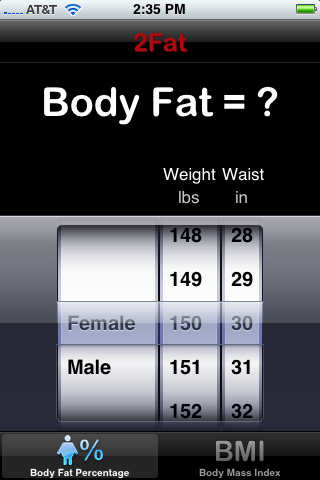
I downloaded this free app out of curiosity. I was taking a gander at the Health & Fitness category in the App Store and saw 2Fat. I thought it would be a weight loss manager or something of that sort and might be suitable to review for iPhoneBuzz, but when I downloaded it, I was sorely disappointed.

Okay, so this app does exactly what it says it will do. You are presented with two scroll wheels: one for your weight and one for your waist size. After selecting both numbers, you are given your body fat percentage. Now, if you switch it over to the BMI setting (body mass index), you’re asked to enter your weight and height. Then, your BMI will be presented.

These are useful numbers if you’re interested in your health, want to lose weight or want to achieve a certain body fat percentage but don’t feel like doing the math to figure it all out.

However, that’s all this app does. And unless you’re super familiar with BMI or how much of a body fat percentage you should have, these numbers are useless to you until you can look them up. This app would be a whole lot better if there were a reference chart included that showed you exactly where you measured up. Without this sort of reference, the apps is essentially useless on the go, unless you can look up a BMI chart, too. But if you ask me, that takes the convenience right out of this thing.


Saturday, July 18, 2009

Quickie Review: Cubes Lite


I’ve found another one. Yes, I’m talking about a free app that is sure to steal away much of my free time. It’s called Cubes Lite and this one is so fun and surprisingly difficult that I can’t put down my iPhone.

The object of this game is to match up as many cubes as you can of the same color before eliminating them. By touching a grouping of cubes, you can see how many points they’re worth. Double tapping will clear them. But the challenge is the fact that you only have a certain number of moves allowed per round. If, after your set number of moves, you haven’t reached the required score, the game will be over.

The game looks easy, but there is a level of strategy to it. It looks very much like a Rubix Cube, but each row doesn’t rotate on its own. However, you can turn the entire block of cubes around to get a look at each side to make the most of your combinations. The sound effects are clear and interesting as are the graphics. This one’s simple but a real joy to play.

I might just shell out the buck or two for the full version of this game.


Friday, July 17, 2009

Hotels.com App Really an iPhone Optimized Website


One thing you may notice if you download Hotels.com’s iPhone app is that it’s not much of an app at all. And since it’s free, that’s not really a big deal. However, it makes for interesting speculation about how third-party apps could act more like native iPhone apps.

You see, when you open the Hotels.com app, you’re presented with a button to “Find Hotels Near Me.” Once you press it, you’re whisked off to the Hotels.com website—its website specifically customized for the iPhone. Pretty neat, huh?

Once on the website, you can find a hotel and book a room without running into any issues. Imagine that! An app without issues! There may not be much app included in this app, but that doesn't make it any less convenient or useful.

[via Inside iPhone]


Wednesday, July 15, 2009

Get Rid of the Felt-Marker Look in Notes


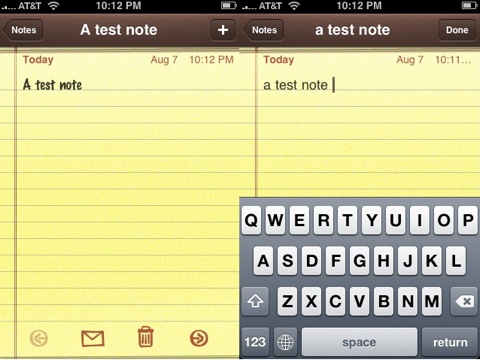
If you, like many, are sick of the look of the felt marker look in the iPhone Notes app, you can switch it out for something less bulky. And the best part is, the tools to complete this changeover are included in your iPhone already. No hacking required!

Step 1: Go into your iPhone’s Settings>General>Keyboard.

Step 2: Go into International Keyboards

Step 3: Select Chinese, then pick either one of the Chinese keyboards.

Step 4: Activate Pinyin.

Step 5: Press the Home button, then open the Notes app.

Step 6: When you go to type, you should see a world key. Tap it and the keyboard will change to the Chinese one. Press one letter to see the font has changed.

Step 7: Press the world key again and the keyboard will switch back to English. Now, this note will be typed on the less bold font.

You’ll need to press the world key for each new note you make, but it’s worth it if you’re sick of looking at that felt-tipped font.

[via The iPhone Blog]


Tuesday, July 14, 2009

JAVOedge’s Embossed Leather Back Cover


Here is yet another case, actually three, to help you in your search for the perfect iPhone case for you.  All three of these are definitely girly cases, featuring stars, butterflies and even flowers.  Not really anything to appeal to the guys in there.

From the looks of the site, I am guessing this is just for the 1st Gen phones, although I could be wrong on that.  I have to say, all three of these cute little cases have texture, like the butterflies bubble up from the case.  Which I know ended up bothering me when it came to my iPod Touch case.

That's purely a preference thing though, you just have to know what you like.  The case is currently being sold for $19.95 and comes in the three different styles shown here.

[via chipchick]


Monday, July 13, 2009

RIP: PhoneSaber


One of my favorite, albeit pointless apps for my iPhone is PhoneSaber. It's the simple app that turns your phone into a lightsaber. It uses the accelerometer to make lightsaber sound effects as you swing around your phone. It's definitely a must-have for any Star Wars fan, however, it has been pulled from the App Store.

Apparently the folks at LucasArts and THQ Wireless (they own the rights to mobile Star Wars apps) didn't care too much for their licenses being used without permission. They contacted the app's creators and rather than sending them a good old fashioned cease and desist letter, they offered something of a proposal.

Essentially, the app needed to be removed, but they want to work with the creators (TheMacBox) on creating an officially licensed iPhone app along the same lines. At least the story has a (mostly) happy ending. At least those of us that already grabbed PhoneSaber can still enjoy it.

[via CrunchGear]


Sunday, July 12, 2009

Quickie Review: Comet Cowboy Lite


Asteroids is one of those games that's been around since the beginning of time, or at least since before I was born. The concept is simple, you point your space ship at an asteroid, and shoot it. You can also move around to avoid getting hit, and the larger chunks of space rock break into smaller bits. Well, Comet Cowboy is similar to Asteroids, except that you don't blow up the rocks, but rather you want to mine them. Actually, the game really isn't much like Asteroids at all.

The concept is simple, you have a bunch of comets floating around that you need to mine. There is a rather large area that you can navigate to find them. Once you have found one, you tap the screen and draw a lasso around it, then tap again to draw it in for mining. You can lasso more than one at the same time for double points. It's relatively simple, and the four levels you get don't last very long. It's fun enough, but won't keep you entertained for more than a few minutes. There is a full version of the game that you can purchase for $4.99 (as opposed to the Lite version, which is free) however, they don't list how many levels there are on the paid version.


Friday, July 10, 2009

Quickie Review: Shakespeare


If you are into literature and the classics, the free Shakespeare app might be just right for you. Developed by Readdle, this app uses the online resource PlayShakespeare.com to pull the bard's works right onto your iPhone. Pretty neat, huh?

So this app is pretty much exactly what it sounds like--a convenient way to access Shakespeare's works on the go. But it does have a few tricks up its sleeve. 

For instance, each play is broken up into acts to be accessed individually. Plus, the dramatis personae (that's cast of characters) is accessible on its own as well. You can also increase the font size to make reading on the small screen easier. 

I found that you can't scroll through the text, exactly, but you can double tap at the bottom of the screen to make it scroll up. This is a bit of a pain, but it helps you keep your place so that's a good thing. Also, the inclusion of line numbers would be extremely helpful to those industrious students needing to take note of a particular passage. 

One other thing I would liked to have seen is perhaps links to words that are not a part of standard English anymore or a glossary of some sort. But again, this is a free app so I may be asking for too much. Or, (and even better) some of these additions may be included in future updates. A girl can hope! 

If you're into literature, this one's worth the download.